
Table of Contents
- Quick Answer: what’s new in Node.js 27
- New Iterator superpower: zip, zipKeyed, join, and includes
- More accurate sums with Math.sumPrecise()
- node:net/promises and async-iterable TCP servers
- Virtual File System (node:vfs) is now unflagged
- More Node.js Core upgrades: fs, Permissions, Test Runner, and HTTP
- Under the hood: V8 15.6, the 4 GB Heap Default, and OpenSSL 4.1
- Heads-up: Node.js 27 breaking changes
- Should you use Node.js 27 today?
- Wrapping up
- Frequently Asked Questions
On October 29, 2026, the Node.js team published v27.0.0-alpha.0.0.0. If you have been using Node.js for a few years, that version string alone probably made you do a double take. Where is the usual October v27.0.0 Current release?
Node.js 27 is the first release to follow the new annual schedule. Under the old schedule, October brought a major release that reached end of life six months later without entering Long Term Support (LTS). October now starts a six-month Alpha phase, ahead of the 27.0.0 Current release in April 2027 and LTS promotion in October 2027.
In this first Alpha, V8 moves from 14.6 to 15.6, adding Iterator.zip(), Iterator.zipKeyed(), Iterator.prototype.join(), Iterator.prototype.includes(), and Math.sumPrecise(). There is a promises API for node:net, along with async-iterable TCP servers. The Virtual File System (node:vfs) is now unflagged, the Permission Model gains --allow-env, and HTTP and memory defaults change too.
We’ll start with the JavaScript and Node.js APIs you can use in everyday code, comparing them with the older approaches. Then we’ll cover runtime changes and what to check before upgrading.
Quick Answer: what’s new in Node.js 27
The main additions in Node.js 27 so far:
- New
Iteratorhelpers (zip,zipKeyed,join,includes) pair sequences, join their values into strings, and search them without collecting intermediate arrays. Math.sumPrecise()sums an iterable of numbers without rounding each intermediate addition.node:net/promisesand async-iterablenet.Serverlet you useasync/awaitto set up TCP servers and sockets.- Virtual File System (
node:vfs) is unflagged, making in-memory file systems and--vfs-loadavailable without--experimental-vfs. - Core upgrades across
fs, permissions, test runner, andhttp, including atomic temp files withfs.mkstemp(),--allow-env, Jest-style mock helpers, and a 65-second HTTPkeepAliveTimeout. - V8 15.6 and OpenSSL 4.1 update sorting and cryptography, and the default heap limit rises to 4 GB on an 8 GB machine.
For example, we can format a list of products and total their prices:
const items = ['Keyboard', 'Mouse', 'Monitor']const prices = [129.99, 49.99, 349.95]
const lines = Iterator.zipKeyed({ item: items, price: prices })  .map(({ item, price }) => `${item} ($${price.toFixed(2)})`)  .join(', ')
console.log(`${lines} -> Total: $${Math.sumPrecise(prices)}`)// Keyboard ($129.99), Mouse ($49.99), Monitor ($349.95) -> Total: $529.93
If you want to experiment locally, check your current Node.js version before running the snippets below.
New Iterator superpower: zip, zipKeyed, join, and includes
This is the part of the release I’m most excited about. I love seeing how far we can push streams, iterators, and generators. Our article on JavaScript async iterators should give you an idea of what I mean.
In What’s new in Node.js 26, we used Iterator.concat() to consume multiple iterables one after another. Node.js 27, through V8 15.6, lets us consume them side by side, pairing values at the same position.
Pairing sequences lazily with Iterator.zip()
Suppose you are checking a weather forecast against the temperatures recorded over the same four days. The predictions come from your model, while the actual values come from observations. To calculate each day’s error, you need to pair the values at the same position. Both sequences must cover the same days in the same order.
In Node.js 26 and earlier, if both sequences were arrays, you would typically use .map() with an index lookup:
// Node.js 26 and earlierconst predicted = [18, 21, 20, 23]const actual = [19, 20, 22, 21]
const errors = predicted.map((prediction, i) => actual[i] - prediction)console.log(errors) // [1, -1, 2, -2]
That works well for arrays. But what if observations come from a generator, or your model returns an iterator of predictions? Index lookups won’t work on those inputs, and converting them to arrays means loading both sequences into memory first.
In Node.js 27, Iterator.zip() takes an iterable of iterables and returns a lazy iterator of pairs. We can calculate the errors with the same pipeline whether the inputs are arrays or iterators:
const predicted = [18, 21, 20, 23]const actual = [19, 20, 22, 21]
const errors = Iterator.zip([predicted, actual])  .map(([prediction, observation]) => observation - prediction)  .toArray()
console.log(errors) // [1, -1, 2, -2]
Each pair contains a prediction and its corresponding observation. A positive error means the day was warmer than predicted; a negative error means it was cooler. The pairing and mapping happen one item at a time. Only the final .toArray() collects the errors into an array so we can print them together.
Another common use is the dot product of two vectors: multiply matching components, then add the products. This operation appears in graphics, machine learning, and numerical computing:
const a = [1, 2, 3]const b = [4, 5, 6]
const dotProduct = Iterator.zip([a, b], { mode: 'strict' })  .map(([x, y]) => x * y)  .reduce((sum, product) => sum + product, 0)
console.log(dotProduct) // 32 (1 * 4 + 2 * 5 + 3 * 6)
Here we never collect the pairs or products into an intermediate array. We also use mode: 'strict' because a dot product requires vectors of equal length: silently ignoring extra components would hide an input error.
Combining endless iterators: solar generation and household consumption
So far, our inputs have been arrays. But Iterator.zip() also works with iterators that have no end. Imagine a home with two power meters: one measures solar generation, and the other measures household consumption. Each meter gives us its current reading in watts whenever we poll it. Subtracting consumption from generation tells us whether the house has surplus power to export or needs to import power from the grid (assuming there is no battery).
We can wrap each meter in an endless generator. Here we simulate the readings with random values so the example runs without hardware:
function* powerReadings(readWatts) {  while (true) {    yield readWatts()  }}
// Simulated meters: each call produces a fresh reading in watts.const solar = powerReadings(() => Math.round(Math.random() * 4000))const household = powerReadings(() => Math.round(Math.random() * 3000))
const netPower = Iterator.zip([solar, household]).map(  ([generation, consumption]) => generation - consumption,)
for (const watts of netPower.take(5)) {  if (watts > 0) {    console.log(`Exporting ${watts} W`)  } else if (watts < 0) {    console.log(`Importing ${-watts} W`)  } else {    console.log('Generation matches consumption')  }}
Neither generator reads anything until we request a value from netPower. Each request polls both meters once and calculates the difference. Both input iterators can keep producing readings forever, but .take(5) limits this demo to five pairs. Collecting either input with [...solar] or .toArray() would never finish and would eventually exhaust memory.
These are synchronous, on-demand readings: the two meters are polled sequentially, close together, rather than at exactly the same instant. The loop takes five readings immediately; zip() does not add a polling interval. With real hardware, the callbacks would read the meters instead of generating random numbers.
Turning columns into objects with Iterator.zipKeyed()
Tuple arrays like [prediction, observation] are easy to read for two or three items, but once you have four or five parallel sources, positional destructuring gets easy to mix up.
Iterator.zipKeyed() accepts an object whose values are iterables. Each step yields an object with the same keys, so you can refer to values by name instead of position:
const columns = {  id: [101, 102, 103],  user: ['alice', 'bob', 'charlie'],  role: ['admin', 'editor', 'viewer'],}
const rows = Iterator.zipKeyed(columns)
for (const row of rows) {  console.log(`${row.user} (#${row.id}) has role: ${row.role}`)}// alice (#101) has role: admin// bob (#102) has role: editor// charlie (#103) has role: viewer
If an API returns each field as a separate array, like user IDs, names, and roles, Iterator.zipKeyed() lets you process them together as a lazy sequence of row objects. The arrays must describe the same records in the same order.
Finishing pipelines with Iterator.prototype.join() and includes()
In Node.js 26, a common way to format a lazy iterator pipeline as a string was to call .toArray().join(', ') at the end. The final .toArray() allocated an array of strings that .join() consumed and discarded.
V8 15.6 adds two terminal helpers directly onto Iterator.prototype:
Iterator.prototype.join(separator): consumes the iterator and joins items into a string directly.Iterator.prototype.includes(value): consumes the iterator until it finds a matching value (usingSameValueZeroequality, just likeArray.prototype.includes()) and short-circuits immediately.
For join(), let’s return to our sensor readings. This time we only need one temperature sensor, and we want to format five readings as a comma-separated string. As before, we simulate the hardware so you can run the example locally:
function* temperatureReadings() {  while (true) {    yield 18 + Math.random() * 6  }}
const readings = temperatureReadings()  .take(5)  .map((temperature) => `${temperature.toFixed(1)}°C`)  .join(', ')
console.log(readings)// For example: 21.3°C, 19.8°C, 23.1°C, 20.0°C, 22.4°C
.take(5) makes the endless source finite, .map() formats each reading, and .join() builds the string without collecting an intermediate array. These five readings are taken immediately, with no delay between them. Without .take(5), joining this endless iterator would never finish.
For includes(), imagine checking whether a commit message references a particular issue. String.prototype.matchAll() already returns an iterator, so we can extract the complete references and search them directly:
const message = 'Fixes APP-142. Follow-up work tracked in APP-208.'
const references = message.matchAll(/\bAPP-\d+\b/g).map((match) => match[0])
console.log(references.includes('APP-142')) // true
includes() stops as soon as it finds APP-142, without extracting the later reference. Matching complete references also avoids the false positive you would get from message.includes('APP-14'), which matches part of APP-142. The search consumes the iterator, so create a fresh one for another search.
More accurate sums with Math.sumPrecise()
Beyond iterator helpers, V8 15.6 also brings a useful addition for numerical calculations: Math.sumPrecise(). To see why it matters, let’s look at a familiar floating-point surprise.
// Node.js 26 and earlier - floating-point drift in actionconst cartPrices = [129.99, 49.99, 349.95]const naiveTotal = cartPrices.reduce((sum, price) => sum + price, 0)
console.log(naiveTotal)// 529.9300000000001 (!)
// Even worse: catastrophic cancellation when large and small numbers mixconst ledger = [1e20, 0.1, -1e20]console.log(ledger.reduce((sum, n) => sum + n, 0))// 0 (the 0.1 completely vanished!)
When you sum numbers with .reduce((a, b) => a + b, 0), each addition rounds its intermediate result to the nearest representable 64-bit float. Over dozens or thousands of additions, those tiny rounding errors accumulate. Worse, if you add a small number (0.1) to a huge number (1e20) and later add -1e20, the 0.1 is lost completely during the first addition because a 64-bit float doesn’t have enough mantissa bits to hold both magnitudes at once.
In Node.js 27, V8 15.6 enables Math.sumPrecise() by default. It accepts any iterable of numbers, computes the sum using an internal high-precision accumulator, and rounds only once at the very end:
const cartPrices = [129.99, 49.99, 349.95]console.log(Math.sumPrecise(cartPrices))// 529.93
const ledger = [1e20, 0.1, -1e20]console.log(Math.sumPrecise(ledger))// 0.1 (no precision lost!)
Math.sumPrecise() accepts any iterable, so it also works with the iterators from the previous section. You can pass the result of .map() directly into Math.sumPrecise() without calling .toArray() first:
const orderLines = [  { item: 'USB-C Hub', qty: 2, unitPrice: 39.99 },  { item: 'Mouse', qty: 1, unitPrice: 49.99 },  { item: 'Monitor', qty: 1, unitPrice: 249.95 },]
const total = Math.sumPrecise(  orderLines.values().map((line) => line.qty * line.unitPrice),)
console.log(`Order total: $${total}`) // Order total: $379.92node:net/promises and async-iterable TCP servers
The core node:net module gets iterator support too.
For years, node:fs, node:dns, node:stream, node:timers, and node:readline have all had .promises sub-modules. Yet node:net remained purely callback- and event-driven. If you wanted to spin up a TCP server on an ephemeral port in a test or connect a client socket using async/await, you had to wrap 'listening', 'connect', and 'error' events by hand.
In Node.js 26 and earlier, setting up a TCP server and client with async/await looked like this:
// Node.js 26 and earlier - manual event-to-promise wiringimport { createServer, createConnection } from 'node:net'import { once } from 'node:events'
const server = createServer((socket) => {  socket.end('Hello from TCP server\n')})server.listen(0, '127.0.0.1')await once(server, 'listening')
const { port } = server.address()const client = createConnection({ port, host: '127.0.0.1' })await once(client, 'connect')
for await (const chunk of client) {  console.log('Received:', chunk.toString().trim())}server.close()
Node.js 27 introduces the experimental node:net/promises module with two helpers, listen() and connect(), and makes net.Server itself an async iterable.
Let’s try something fun and build a small TCP chat server. Each connected client can send a line of text, and the server forwards it to every other client, prefixed with the sender’s connection ID:
import { listen } from 'node:net/promises'import { createInterface } from 'node:readline'
const ac = new AbortController()const server = await listen({  port: 8124,  host: '127.0.0.1',  signal: ac.signal,})server.maxConnections = 10
const clients = new Map()
async function handleConnection(socket) {  const clientId = `${socket.remoteAddress}:${socket.remotePort}`  const lines = createInterface({ input: socket, crlfDelay: Infinity })  clients.set(clientId, socket)
  // Close the line iterator even if the connection ends abruptly.  socket.once('close', () => lines.close())  socket.on('error', (error) => {    console.error(`${clientId}:`, error.message)    lines.close()  })
  socket.write(`Connected as ${clientId}\n`)  console.log(`${clientId} joined`)
  try {    for await (const message of lines) {      for (const [otherId, otherSocket] of clients) {        if (otherId !== clientId && !otherSocket.destroyed) {          otherSocket.write(`${clientId} > ${message}\n`)        }      }    }  } finally {    clients.delete(clientId)    lines.close()    socket.destroy()    console.log(`${clientId} left`)  }}
process.once('SIGINT', () => {  ac.abort()  for (const socket of clients.values()) socket.destroy()})
console.log('Chat listening on 127.0.0.1:8124. Press Ctrl+C to stop.')
for await (const socket of server) {  // Each handler stays active for the lifetime of its connection.  void handleConnection(socket).catch((error) => {    console.error('Connection handler failed:', error)    socket.destroy()  })}
Run the server from the companion repo:
node 03-net-promises/net-promises.jsThen open two or three other terminals and run this command in each (with netcat installed):
nc 127.0.0.1 8124Each terminal receives its connection ID, for example Connected as 127.0.0.1:54321. Type a message and press Enter. The other terminals receive a line such as 127.0.0.1:54321 > Hello everyone!. The server does not echo messages back to their sender. Press Ctrl+C in a client terminal to disconnect, or in the server terminal to close the chat and all active connections.
With three netcat clients connected, each terminal receives the other clients’ messages:
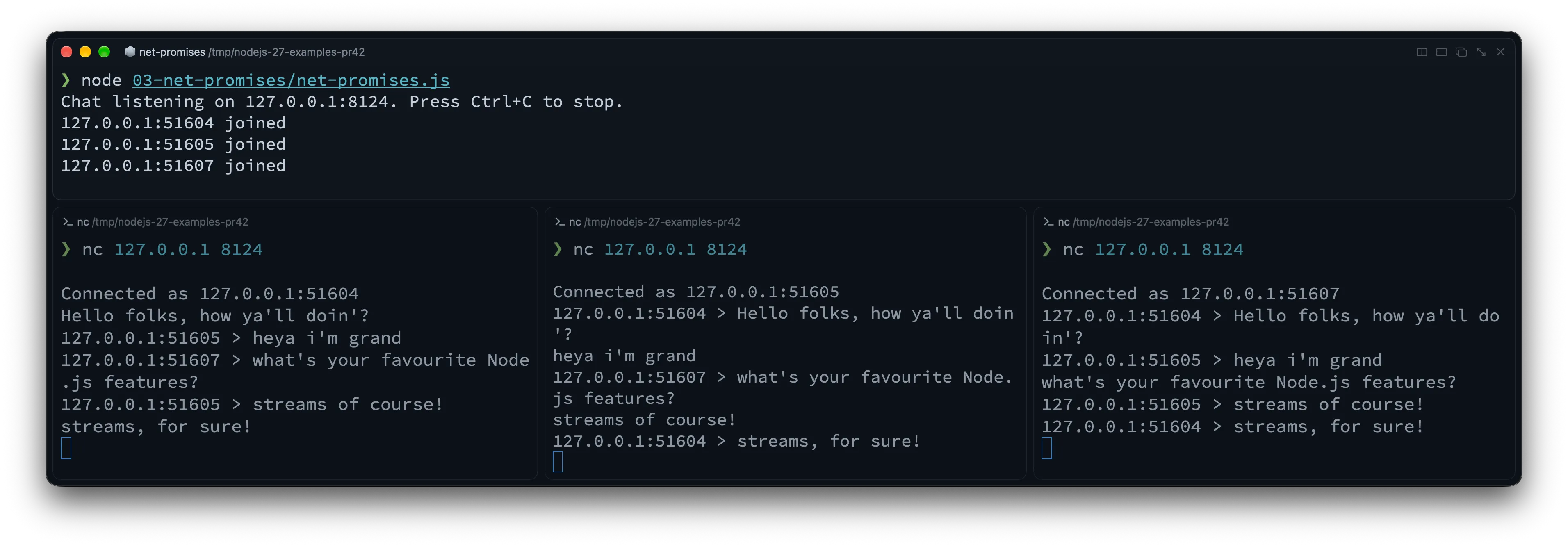
listen() resolves once the server is listening. The clients map tracks active sockets by their remote address and port, which distinguish connections to this server. These are connection labels, not permanent user identities: reconnecting can give a client a different port.
Inside each handler, readline turns the socket’s byte stream into lines. TCP chunks do not correspond to messages: a line may arrive in several chunks, or one chunk may contain several lines. Each completed line is broadcast to every other active socket. The finally block removes disconnected clients and closes their resources.
The outer connection loop starts each handleConnection(socket) call without awaiting it. That lets it accept the next client while earlier handlers wait for messages. Each handler still awaits its own incoming lines, so clients can remain connected and chat concurrently. The .catch() handles rejected handler promises; socket errors are handled separately, and server.maxConnections = 10 caps open connections for this demo.
Virtual File System (node:vfs) is now unflagged
Testing code that reads configuration files often means mocking node:fs or creating temporary directories and cleaning them up afterward. Bundling assets or templates into an archive poses a related problem: how can your application read them through its usual node:fs calls?
The new node:vfs (Virtual File System) module was originally introduced behind --experimental-vfs, and in Node.js 27 it is unflagged and available out of the box (though still marked Experimental Stability 1 while the API settles).
With node:vfs, you can create an isolated, in-memory file system with vfs.create(), populate it using standard fs-style methods, and mount it so regular node:fs operations (and import / require()) can read from it directly. VirtualFileSystem also supports Explicit Resource Management (using), which unmounts it when execution leaves the block:
import { readFile } from 'node:fs/promises'import { join } from 'node:path'import vfs from 'node:vfs'
async function loadAppConfig(configDir) {  const raw = await readFile(join(configDir, 'app.json'), 'utf8')  return JSON.parse(raw)}
// Create an in-memory VFS that automatically unmounts at the end of the block{  using memoryFs = vfs.create()  memoryFs.mkdirSync('/etc/myapp', { recursive: true })  memoryFs.writeFileSync(    '/etc/myapp/app.json',    JSON.stringify({ env: 'test', featureFlags: ['vfs'] }),  )
  // Mount into Node's reserved virtual namespace (e.g. /dev/null/vfs/1)  const mountPoint = memoryFs.mount()
// Regular node:fs functions can now read from the mounted path! const config = await loadAppConfig(join(mountPoint, 'etc/myapp')) console.log('Loaded from VFS:', config)}// memoryFs is automatically unmounted here!memoryFs.mount() mounts the virtual file system under a reserved namespace (path.join(os.devNull, 'vfs'), such as /dev/null/vfs/1 on POSIX), so a virtual mount can never accidentally shadow or overwrite real files on your disk. If you want to compare this with working on real files, check out our guide on reading and writing files in Node.js.
You can also use node:vfs through --vfs-load on the CLI without an experimental flag:
node --vfs-load=04-vfs/bundle# Hello from the VFS bundleThat command mounts the companion repo’s 04-vfs/bundle directory and runs its index.js, which prints Hello from the VFS bundle. You can also pass a ZIP archive; Node.js runs its package.json "main" or index.js entry point from the mounted archive. And if you use Single Executable Applications (SEA), vfsArchive is now mounted at layer 0 and automatically available inside Worker threads too.
More Node.js Core upgrades: fs, Permissions, Test Runner, and HTTP
There are changes across the standard library too, from temporary files to HTTP server defaults.
Atomic temporary files with fs.mkstemp() and native fs.glob()
Until now, if you needed a temporary file in Node.js, your safest built-in option was fs.mkdtemp() to create a temporary directory, and then opening a file inside it. Creating a random filename yourself and calling fs.open() was error-prone and required a retry loop in case of collisions.
Node.js 27 adds APIs modeled on POSIX mkstemp(3): fs.mkstemp(), fs.mkstempSync(), and fsPromises.mkstemp(). It atomically generates a unique filename (appending six random characters to your prefix) and opens the file in a single step, returning both the path and the open FileHandle (or file descriptor fd):
import { mkstemp, rm } from 'node:fs/promises'import { tmpdir } from 'node:os'import { join } from 'node:path'
const prefix = join(tmpdir(), 'export-')const { path, handle } = await mkstemp(prefix)
try {  await handle.writeFile('id,status\n1,ok\n', 'utf8')  console.log(`Wrote temporary report to ${path}`)} finally {  await handle.close()  await rm(path)}
The built-in fs.glob() (introduced in Node.js 22) was ported from JavaScript to native C++ in Node.js 27. The maintainers’ benchmarks show substantial speedups for some workloads, but gains vary by API and options, and one synchronous exclude-pattern workload regressed. Benchmark your own patterns before assuming a speedup.
Permission Model gets --allow-env
As we covered in our guide to environment variables in Node.js, process.env is where most applications keep their most sensitive secrets (API keys, database URLs, signing tokens). It is also the very first place a compromised dependency looks when trying to exfiltrate credentials.
Node.js 27 adds --allow-env to the Permission Model (--permission). When --permission is enabled, every environment variable not explicitly matched by --allow-env is scrubbed at process startup before any JavaScript runs (except runtime variables like PATH, HOME, LANG, and NODE_OPTIONS, plus variables explicitly loaded via --env-file):
# Only allow variables starting with PUBLIC_ or APP_SECRET_KEY=super-secret APP_PORT=3000 \ node --permission --allow-env='PUBLIC_*,APP_*' 05-core-upgrades/permissions-env.js# { port: '3000', secret: undefined }Node.js also scrubs disallowed variables from the underlying OS environment block and restricts access to /proc/self/environ on Linux. Native code loaded by Node.js sees the reduced environment too. This reduces accidental exposure; the Permission Model is not a sandbox for malicious code. You can remove a variable after reading it with process.permission.drop('env', 'VARIABLE_NAME'). Keep NODE_ENV explicitly if your application uses it, since it is not preserved by default.
Built-in Test Runner: stable watch mode and Jest-style mock helpers
The built-in node:test runner has three updates:
- Watch mode (
node --test --watch) is now officially stable (Stability 2). --test-forbid-onlyfails the test run if any test is marked with{ only: true }ortest.only(), so CI can catch accidental.onlycommits.- Shorthand methods on mocks: instead of wrapping simple return values or promises inside
fn.mock.mockImplementation(() => ...),MockFunctionContextnow hasmockReturnValue(),mockResolvedValue(),mockRejectedValue(), andmockThrownValue():
import { test, mock } from 'node:test'import assert from 'node:assert/strict'
test('mock shorthand helpers in Node.js 27', async () => {  const getDiscount = mock.fn()  getDiscount.mock.mockReturnValue(0.15)  assert.strictEqual(getDiscount(), 0.15)
  const fetchUser = mock.fn()  fetchUser.mock.mockResolvedValue({ id: 42, name: 'Luciano' })  assert.deepStrictEqual(await fetchUser(), { id: 42, name: 'Luciano' })
  const failSync = mock.fn()  failSync.mock.mockThrownValue(new Error('Invalid token'))  assert.throws(() => failSync(), /Invalid token/)})
Smarter HTTP & HTTP/2 defaults
These three HTTP changes affect production web servers:
http.ServerkeepAliveTimeoutincreased from 5 seconds to 65 seconds: Running a Node.js HTTP server behind an AWS Application Load Balancer (ALB), Nginx, or Cloudflare can produce intermittent502 Bad Gatewayerrors when the proxy keeps an upstream connection available longer than Node.js keeps it open. AWS ALB, for example, defaults to a 60-second idle timeout, while Node.js historically setkeepAliveTimeoutto 5 seconds (5000ms). If Node.js closes an idle socket just as the proxy reuses it, the forwarded request can fail with a 502. The actual socket timeout also includeskeepAliveTimeoutBuffer(1 second by default). The new defaultkeepAliveTimeoutof 65 seconds (65000ms) exceeds a 60-second proxy timeout. Check your proxy’s actual idle timeout and configure Node’s timeout to exceed it; 65 seconds does not cover every proxy configuration.req.headersandreq.trailersnow have anullprototype: Incoming request headers (Object.getPrototypeOf(req.headers) === null) no longer inherit fromObject.prototype. This prevents prototype-pollution edge cases when looking up header names likereq.headers['toString']orreq.headers['constructor']and matchesreq.headersDistinct. (See the breaking changes section below if your code callsreq.headers.hasOwnProperty(...)!)- Larger HTTP/2 window sizes:
node:http2increased its default flow-control window sizes and trimmed per-request callback overhead, improving throughput on high-bandwidth HTTP/2 connections without manual tuning.
Under the hood: V8 15.6, the 4 GB Heap Default, and OpenSSL 4.1
Node.js 27 also updates its engine and bundled dependencies:
- Default Heap Limit up to 4 GB on mid-sized machines:
When
--max-old-space-sizeis not specified, V8 now sets the default old-generation heap limit to half of physical memory (or container cgroup memory), clamped between 256 MB and 4 GB. Previously, machines with less than 15 GB of RAM were capped at 2 GB. On an 8 GB container or VM, the default old-generation limit therefore rises from 2 GB to 4 GB (and on a 6 GB machine, from 2 GB to 3 GB). These are old-generation limits, not limits on the process’s total memory use. BufferandArrayBuffermemory affects garbage collection scheduling: Memory held byBufferandArrayBufferinstances is now included in V8’s global allocation limit. If your app allocates large off-heap buffers (for example, image processing or large file buffers), this affects when garbage collection is scheduled. The global allocation limit is distinct from the old-generation heap limit and does not impose a hard cap on the process’s total memory.- V8 15.6 performance improvements:
Array.prototype.sort()now uses PowerSort instead of TimSort for large arrays (still stable, with better performance on tricky input distributions).awaiton an already-fulfilled Promise incurs fewer microtasks and allocates less, and async generators are around 6% faster on file-system benchmarks.Intl.Locale.prototype.variantsis now available to inspect locale variants (for example,new Intl.Locale('sl-rozaj-biske').variantsreturns'biske-rozaj').
- OpenSSL 4.1.0, Undici 8.12, SQLite 3.54, and npm 12.1.0:
Node.js 27 upgrades its bundled cryptography to OpenSSL 4.1.0, strips out all legacy OpenSSL 1.x compatibility shims and engine APIs, bumps
npmto 12.1.0, and updatesNODE_MODULE_VERSIONto 153.
Heads-up: Node.js 27 breaking changes
The Alpha window gives you time to check for breaking changes before the stable release. Most applications won’t encounter all of these, but check your code and dependencies for the following changes.
1. req.headers has a null prototype
Because req.headers and req.trailers in node:http are now created with Object.create(null), calling req.headers.hasOwnProperty() throws a TypeError. This runnable example checks that failure and demonstrates Object.hasOwn() instead. Checking for a header’s presence does not authenticate its value:
import { createServer } from 'node:http'import { once } from 'node:events'import assert from 'node:assert/strict'
const server = createServer((req, res) => {  assert.strictEqual(Object.getPrototypeOf(req.headers), null)  assert.throws(() => req.headers.hasOwnProperty('authorization'), TypeError)
  // Check for the header without relying on Object.prototype.  const hasAuthorization = Object.hasOwn(req.headers, 'authorization')  res.end(    hasAuthorization      ? 'Authorization header present'      : 'No authorization header',  )})
server.listen(0, '127.0.0.1')await once(server, 'listening')
try {  const { port } = server.address()  const response = await fetch(`http://127.0.0.1:${port}`, {    headers: { authorization: 'Bearer example' },  })  console.log(await response.text()) // Authorization header present} finally {  server.close()}
2. Memory limits for multi-process deployments
If you run multiple Node.js processes on a 6 GB or 8 GB machine and relied on the old implicit 2 GB heap cap to keep them from starving each other, pass --max-old-space-size=2048 explicitly. Similarly, if your application holds hundreds of megabytes of Buffer data in memory alongside a large JS heap, be aware that Buffer allocations now influence V8’s global allocation limit and garbage collection scheduling.
3. V8 serialization format and larger heap snapshots
v8.serialize(),structuredClone(), andpostMessage()use a new V8 serialization format (which adds support for TypedArrays and resizableArrayBuffers larger than 4 GB instructuredClone()andpostMessage()). Node.js 27 can still read data serialized by older Node.js versions, but older Node.js versions cannot deserialize payloads produced byv8.serialize()in Node.js 27. Watch out if you storev8.serialize()blobs in Redis or a database shared across mixed Node.js versions during a rolling upgrade!- Heap snapshots are ~2x larger and include full script source:
v8.writeHeapSnapshot()andv8.getHeapSnapshot()now always include internal objects, numeric values, and the complete source code of scripts (instead of truncating at 1024 characters). As always, treat.heapsnapshotfiles as sensitive data because they may contain secrets present in your source or memory.
4. Deprecations, removals, and platform changes
node:domainis now runtime-deprecated: Importing or usingnode:domainemits a runtime deprecation warning (and its internals have been ported toAsyncLocalStorage).- Private
_http_*modules deprecated and_tls_*removed: Undocumented internal modules (_http_agent,_http_client,_http_common,_http_incoming,_http_outgoing,_http_server) are deprecated, and_tls_common/_tls_wraphave reached End-of-Life. Always import fromnode:httpandnode:tls. - OpenSSL engines and OpenSSL 1.x dropped: Building from source requires OpenSSL 3.0 or newer (bundled binary builds ship OpenSSL 4.1.0), and custom OpenSSL engine APIs (
clientCertEngine,privateKeyEngine,crypto.setEngine()) are gone. - Calling
Hmac.digest()multiple times is runtime-deprecated. --no-experimental-websocketremoved: The globalWebSocketclient is permanent and can no longer be disabled via CLI flag.- Intel macOS (
darwin-x64) downgraded to experimental: Apple Silicon (darwin-arm64) remains Tier 1, while Intel macOS support is now experimental.
Should you use Node.js 27 today?
For production, the release date matters. For library authors and local experiments, there is already code to try:
- For production workloads: If you are reading this before April 2027, keep using an LTS release. Node.js 27 is still in its Alpha testing phase during that period. It is scheduled to enter Current in April 2027 and become LTS in October 2027 (with support until April 2030). Once a stable release is available, evaluate it against your application’s support requirements.
- For open-source library and framework authors: Add it to your CI now. As we explained in our article on the new release schedule, the Alpha channel lets maintainers catch breaking changes (like
null-prototypereq.headers, V8 15.6 changes, or native add-on ABI updates) months before users upgrade. The Node.js team patchednpmengines checks in this Alpha so CI can accept the-alphaprerelease tag. - For local experimentation and learning: Try
Iterator.zipKeyed(),Math.sumPrecise(),node:net/promises, andnode:vfsin a side project to get familiar with the APIs.
If you want to install the Alpha side by side with your stable LTS runtime without messing up your system setup, check out our guide on 5 ways to install Node.js using version managers like fnm or nvm.
Wrapping up
Node.js 27 starts the annual release schedule, with every major version going on to LTS. Its first Alpha includes V8 15.6, node:net/promises, an unflagged node:vfs, fs.mkstemp(), and --allow-env.
I’d start by trying Iterator.zipKeyed() and Iterator.prototype.join() in a data-transformation script. They let you process parallel collections lazily without collecting intermediate arrays.
For the full list of commits and low-level details, check out the official Node.js 27.0.0-alpha.0.0.0 release notes and the companion post on Notable V8 changes from Node.js 26 to 27 (Alpha).
Thanks to the Node.js releasers, V8 maintainers, and contributors who worked on this first Alpha and the new release schedule.
See you in the next article!
Frequently Asked Questions
Why did Node.js 27 start with an Alpha release in October 2026?
Node.js 27 is the first version under the new Node.js release schedule. Instead of two major releases per year, Node.js now ships one major release every April, preceded by a six-month Alpha testing phase starting in October.
Will Node.js 27 become an LTS release even though 27 is an odd number?
Yes. Under the new release schedule, the old odd/even rule is gone and every yearly major release becomes LTS. Node.js 27 will enter Current in April 2027, move to LTS in October 2027, and be supported until April 2030.
What are the biggest JavaScript features in Node.js 27?
Thanks to V8 15.6, Node.js 27 ships Iterator.zip(), Iterator.zipKeyed(), Iterator.prototype.join(), Iterator.prototype.includes(), Math.sumPrecise(), and Intl.Locale.prototype.variants enabled by default.
How did the default memory limit change in Node.js 27?
When --max-old-space-size is not set, V8 now defaults to half of physical memory clamped between 256 MB and 4 GB (meaning an 8 GB machine gets a 4 GB heap instead of 2 GB). Additionally, memory held by Buffer and ArrayBuffer instances now counts toward V8’s global allocation limit, affecting when garbage collection runs.
Should I run Node.js 27 in production?
If you are reading this before April 2027, keep production workloads on an LTS release. Node.js 27 is still in its Alpha testing phase during that period, intended for library authors, CI pipelines, and experimentation. It is scheduled to enter Current in April 2027 and LTS in October 2027. Once a stable release is available, evaluate it against your application’s support requirements.

Build production-grade Node.js with confidence. Grab Node.js Design Patterns now.